The past few weeks have seen fairly large scale DDoS attacks directed toward customers on our gaming network, which has in turn, generated packet loss and issues on people being attacked; thereby, affecting the entire gaming network.
To address this issue, we have been working around the clock to strengthen our DDoS protection; however, we have noticed that with every change we make, the attacks seem to circumvent it. Even with such issues, we all maintained proactive disposition and continued to combat the attacks as best as we can, while also notifying the networks that are attacking us to help clean infected servers.
This past week, we have made more changes which are intended to curb such attacks and finally put them under control. Currently, the number of attacks has tremendously decreased from 100+ per week to well below 1 per day, which was made possible by our implementation of new policies and systems internally.
We are pleased to say that our new systems are now in place to deal with such large scale attacks more effectively and efficiently. Whereas before, we had to rely on upstreams to drop a large scale DDoS attack, this can now be done in-house and will help mitigate the attacks.
Rest assured that customers on our business network have not been affected by the attacks directed toward our gaming customers.
Should you wish to discuss this matter in greater detail, please do feel free to give us a call directly on 02 72015063.
Kind regards,
Jared Hirst
Managing Director
Buy new not OLD
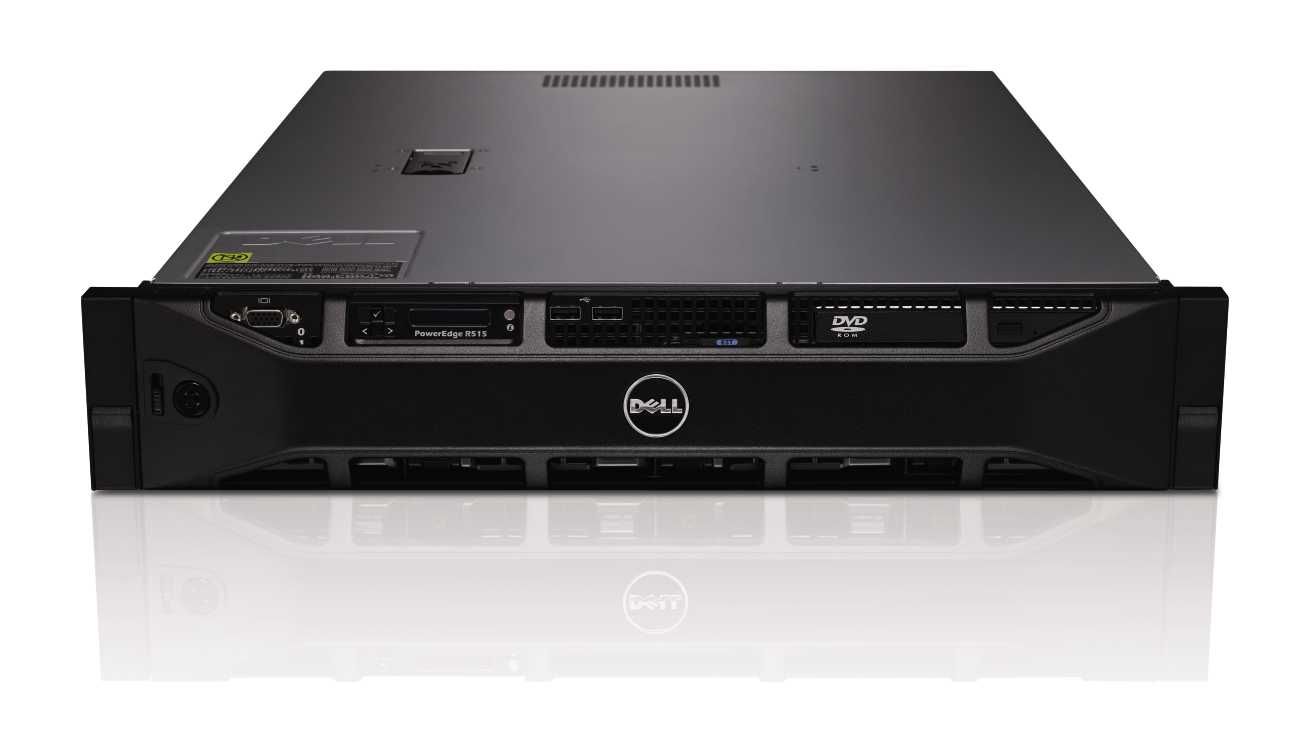
The most important thing when buying a server is to check the age of the server as many hosting companies are offering older style servers, and while these are OK for starting out they are no good for a production or high traffic website. Old servers have been used and the drives degraded, power supplies worked and all components heated and cooled many times. It’s always best to ensure that you ask for a NEW server from your supplier. Servers Australia only ever offer the newest and latest hardware and this means we can repair/replace any of the parts we have in production as we refresh our fleet every few years. Buying older hardware also means it may be harder to source the parts if and when the old server does stop running.
Data Charges
Getting a nasty surprise from your provider is never a good thing so make sure when buying a server you are given a nice data allowance and that you know the cost of excess data up front. As a guide in Australia you should never pay more than $1.10 per GB for excess data charges, as this is standard across the board and is also a reasonable rate. Buying data in bulk or in advance will generally save you 50% off on your data charges and is important to look out for.
Control Panel or Not
When buying a server, you need to decide if you want and need a control panel such as cPanel or Plesk, as there are many advantages and disadvantages to having a control panel. A control panel is a great resource for someone that has a few websites or owns a hosting/design company. Having a control panel is fantastic for customers and for customer management. It will also save a huge amount of admin time to allow you to focus on running your business. If you have a large scale site that is very busy or requires having servers in multiple locations with load balancing then you need to consider not using a control panel and just go for a standard LAMP setup. This will require a little bit more maintenance but it will give you advanced functionality, such as the load balancing and DRDB which is a distributed raid system.
Customer Support
You may run into some tough situations once in awhile, or need a server reboot to fix a locked server. That will require some assistance from your server provider. If you have a hard time getting in contact with the company providing your server, this is a sign that they do not provide very good customer support. As such, it’s best to choose a company that responds to your e-mail tickets promptly and is always there to help you with any problems. Solid customer service can be a lifesaver in a critical situation, so look for a company that offers a SLA for support response times and also a company that provides true 24/7 emergency support, because yes servers NEVER sleep and ALWAYS seem to break during the night! Servers Australia can manage either of the above, as we have qualified level 2 and 3 technicians that have years and years of experience in managing both control panel based servers and also LAMP servers. Remember we are here to ensure that you get the most out of your new server, so ensuring that the right people are in control of it may just save you the headaches during the busy times of your site.
Port speed
The speed of the port that your server is connected to is very important, as you want to be able to get the content from your server off the providers network as fast as possible. In this day and age a 1 Gbit port is generally recommended. This would allow multiple people to be all downloading a large file from your server at full speed. Most DSL connections in Australia are now around 20 mbits per second, so multiple DSL users would cause your server to be bottle necked by the port speed if you had a 10 mbit or 100mbit port. Always ensure that this is checked before committing to a server and it’s also good to do speed tests of the providers server before purchasing.
Disk Speed
When buying a server to be hosted, the speed and quality of the disks is the most important part of the server, as without fast functioning disks the server will come to a grinding halt since all information is read from the disks. View our SSD dedicated server page for more information on the performance difference between SSDs and HDDs.
How can I tell if my provider is really running their own network and hosting me in Australia?
I like to be on top of every issue we have at work, some call me a micromanager and some call me a pain in the backside, however I love my job, and I love my customers! I like to ensure that everyone is getting what they are paying for, and that is a quality service here at Servers Australia! So every day, I spend time with the Sales, Marketing and Support teams to ensure that everything is running as it should! However last week I heard two VERY interesting conversations, one was from tech support and the other was in the sales department.
I heard one of our tech support staff explaining to a customer, that the reason they had issues with their site load time on their old host was because they were being hosted offshore, in the USA to be exact… however they were under the impression that they were hosted here in Australia because they were buying from an Australia hosting company, who claimed to be hosted here in Australia.
This is very common issue, as customers generally don’t know if their host is being true and really is hosting them in Australia or offshore. You might ask, “Why does it matter?” Well there are many reasons, such as site load times, data security and privacy, connectivity congestion to the offshore site and the risk of undersea cable cuts.
The other conversation in the sales side was very similar but a bit different. The provider they were buying off claimed to own their own data centre and network and were a huge global corporation, it was only when our sales manager (Craig) pointed out to them that the host they were buying off was a one man band, and actually hosted their servers on someone else’s network as well as in someone else data centre!!! I was shocked, how can people go around saying that they own these data centre and networks, when they are simply reselling someone else’s services, surely this has to be illegal!
Anyway, the point of me mentioning this is to show customers as well as readers how they can see if they’re being scammed. As we like to be as transparent as possible with our customers, we own and operate our own network, we also own our own data centre, we also lease space in 3 other data centres that are not ours, and we have a physical office with staff in it that any customers or potential customers are more than welcome to swing by and say hello!
So how can you tell if you are hosted overseas?
There are a few things you can do. First of all do a simple PING test to see how long it takes to get a ‘ping’ response from your server; this can be done on any Mac or windows PC. On windows 7 go to start → run → (type cmd and hit enter) → type ‘ping yourwebsite.com.au’
This will then show you something like the above. If you get a result of over say 100 ms, then your site is definitely NOT hosted in Australia. If you get a ‘request timed out’ then this means that you have a firewall that blocks pings (ICMP) from coming into the server, try the below.
Another way to check is to now get the IP that was returned in the above (202.130.35.126 in my case) and then going to the Geo IP data base to look up the location of the IP using this website: http://www.whatismyip.com/tools/ip-address-lookup.asp
This should tell you the country and even the state that your site is hosted in. Pretty cool huh?
If you want to know who actually owns your network, there are a number of tools you can use, the one I use all the time for network lookups is http://bgp.he.net. This tool will show you some very cool and detailed information (if you know how to read it) and will also list who actually owns your IP address range and the servers you are on.
If you go the above URL and enter the IP address that you have been given in the previous part, e.g. 202.130.35.126, and press search, it will show you that ‘description’ of the IP address, and also an AS number, this is the public
network identifier that tells the world where your IP lives. If you click on the AS number, this will then show you who your dedicated server or web hosting provider really is. For example, I have just looked up 202.130.35.126 which is our website, this tells me that we own the IP (http://bgp.he.net/AS45671) and that we connect to 7 different networks, this page will not show all the peers, they can be seen by clicking on the ‘Peers v4’ tab at the top of the page, the more peers the AS number has means the more networks that they are directly connected to.
If you do this search and it doesn’t show your dedicated server provider, then the chances are they do NOT own their own network; therefore they are only reselling someone else’s network. This is all well and good, until an issue arises and you have to wait for your host, who waits for their host, who waits for the supplier (like a chain of command) and this can cause lengthy delays if you need something resolved urgently.
The final issue I want to cover is “does your provider have a physical address?” Do they allow visits to their data centre and staff? We at Servers Australia are always open to visits and also Data Centre tours of the Data Centres that we are allowed to show, so next time you are speaking with you host, challenge them and ask to meet for a coffee at THEIR office and see what they say, you can also ask for a Data Centre tour and see if they really do own their own Data Centre!
We have a position open for a system and network admin  Working from the coast you will enjoy a relaxed life style and fun environment. If you are traveling from Sydney you will get no traffic As you are always going the opposite way of the traffic. If you are on the coast then you get a nice job without having to travel to Sydney!!
Here are the skills we are looking for:
Basic Skills;
- Vyatta Routing
- Traffic management
Required Skills:
- Linux – mainly CentOS & Debian
- Cisco – basic switch and routing skills
- Radius
- Networking
- TCP/IP
- Linux Security and Management
- Testing, troubleshooting and working out issues fast
- Configuring services such as Apache,PHP, MySQL, IPtables, cPanel
- Configuration of backups and backup management
- Customer service
- People Skills
- Communication Skills
- Flexible
- Ability to work in a relaxed environment
- Ability to have fun!
If you’re interested contact us here along with your resume: [email protected]

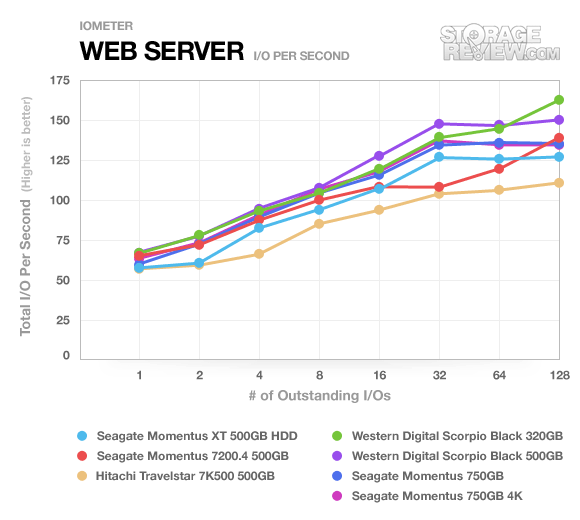
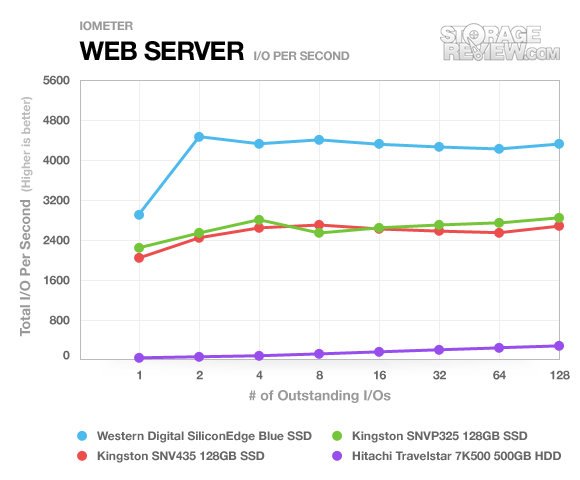
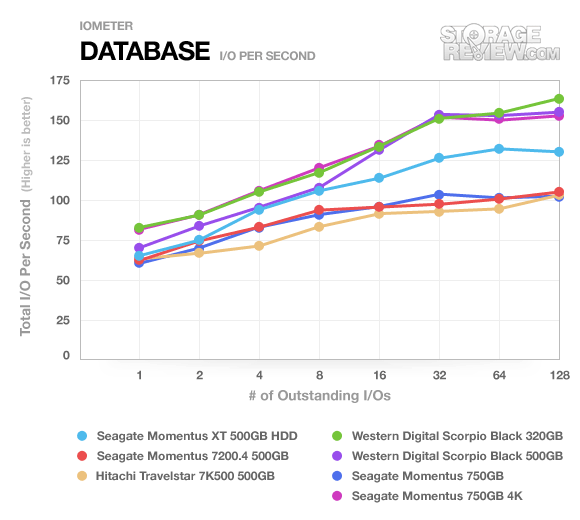
Here are some benchmarks to show the differences between SATA3 hard drives and solid state hard drives for dedicated server applications.
The first benchmark is for web server performance the second benchmark is for database performance.
SATA3 Web Server Performance:
Source: http://www.storagereview.com/seagate_momentus_750gb_review_st9750420as
SSD Web Server Performance:
Source: http://www.storagereview.com/kingston_ssdnow_v_review_snvp325s2
Summary:
SSD Performance: From 1600 I/O to 4700 I/O
SATA3 Performance: From 60 I/O to 170 I/O
This benchmark is for database performance.
SATA3 Database Performance:
Source: http://www.storagereview.com/seagate_momentus_750gb_review_st9750420as
SSD Database Performance:
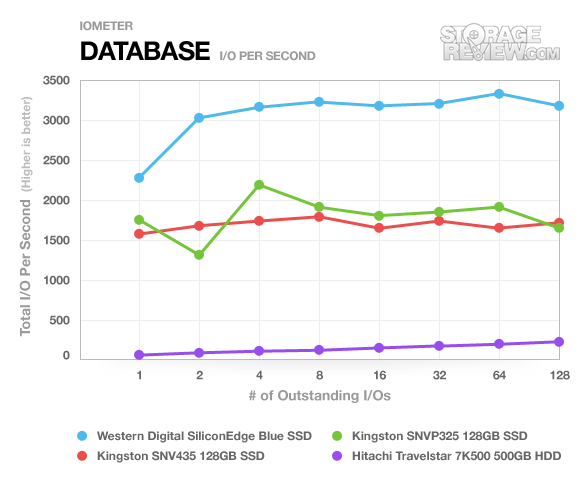
Source: http://www.storagereview.com/kingston_ssdnow_v_review_snvp325s2
Summary:
SSD Performance: From 1350 I/O to 3350 I/O
SATA3 Performance: From 60 I/O to 170 I/O
For the first 100 people we are going to offer FREE business web hosting accounts.
To get it all you need to do is have an ABN. We do check ABN’s so please don’t list anyone else’s ABN as you won’t get the free account.
Please also note that to be fair we are only offering one per person. Go to our special offers page on our website for more details. Please note we will be removing the details on our special offers page once the offer ends.

Business HostingOne
- 100MB Diskspace
- 400MB Data Transfer per month
- 5 Email Accounts
- 1 FTP Account
- 1 MySQL Accounts
- 1 Addon Domain
- 24/7 Email Support
- ABN/ACN Required
(For Ever)
We’re offering 1 Dedicated Server for $1 for a YEAR. We are offering our FASTEST dedicated server. 19.8 Ghz of power for $1. We are also offering a second FREE Virtual Dedicated Server (VDS) our fastest 8 Core VDS!
$1 Dedicated Server Competition

3.3GHz (6 Cores) 300GB Data
- Phenom II 1100T 3.3GHZ 6core
- 8GB DDR3 Memory
- 1TB SATA3 Hard Drive
- 300GB Bandwidth Transfer
- 1 IP Address
This is the same server that we sell here for $397/month. And you can get it for $1 for the YEAR when it costs well over $4500 per year.
How do you get this $1 Dedicated Server?
We are going to run a competition and select one person on February 21st at 11am, Sydney time.
Ways to Win:
1) Like us on facebook.
2) Like our post on facebook.
3) Follow us on twitter.
4) Retweet our tweet on twitter.
The more ways you enter the more chances you have to win. We count each way as a chance in the draw. So if you do all 4, that’s 4 chances in the draw!
Draw Date:
We will draw this on the 21st of February at 11am Sydney time. The winner will be chosen at random from the people who do any of the 4 ways to win.
Free Virtual Dedicated Server Competition:

8 Cores 2048MB RAM
- 8 CPU Cores
- 2048MB RAM
- 50GB Storage
- 200GB Bandwidth
- 40GB FTP Backup
- 1 IP Addresses
Along side the $1 dedicated server we are going to offer a FREE Virtual Dedicated Server (VDS) in a second competition.
How do you get this Free Virtual Dedicated Server?
We are going to run a second competition for the people who liked us on Facebook and select one person on February 21st at 11am, Sydney time.
Ways to Win:
1) Like us on facebook.
1) Enter your name and email into the draw page
Draw Date:
Again on the 21st of February at 11am Sydney time we will select at random one of the people who entered in their email.
We like feedback so comment below, on facebook or on twitter!
Now that the worst of the Flooding is over, now is not the time to stop donating or supporting our fellow Australians.
They are going to need our support more than ever now. With their homes destroyed and no where to live its our responsobility to support them. So until further notice we will be donating all of our setup fees from our dedicated servers (http://www.serversaustralia.com.au/dedicatedservers.php) and our Colocation at Tuggerah (http://www.serversaustralia.com.au/colocation.php) to the Flood Relief Appeal (http://www.qld.gov.au/floods/donate.html).
We are even putting the challenge out to our competitors to follow us and support our fellow Australians. So to all of our competitors we urge you to take us up on this challenge and donate all setup fees from dedicated servers, VDS/VPS and colocation to the flood relief fund.
Interesting:
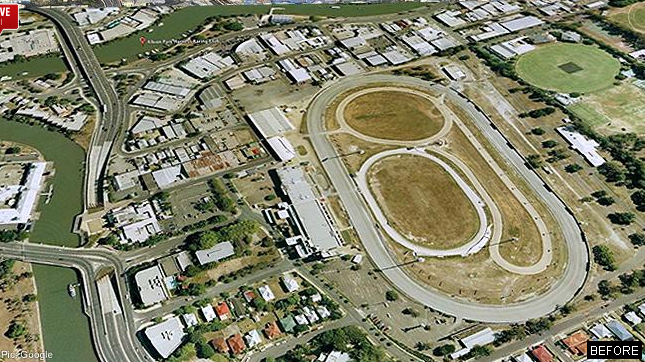
To see the REAL extent of these floods news.com.au has before and after interactive photos. The extent of the floods is amazing. Here is the link here: http://www.news.com.au/breaking-news/floodrelief/queensland-floods-interactive-before-and-after-photos/story-fn7ik2te-1225987255127
Here is an example of the pictures you will see at the link above (Note this isn’t our picture and we didn’t take it. Its from the link above and I think its owned by news.com.au)
Before:
After:
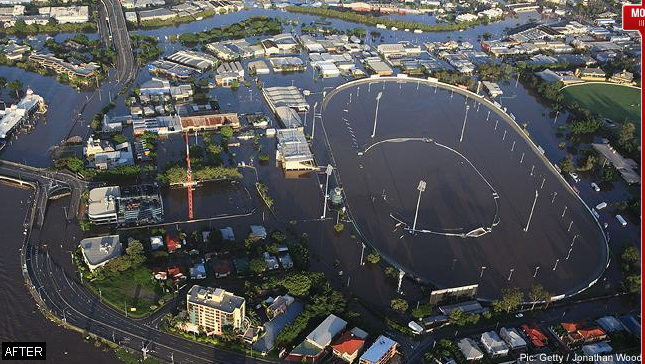
These pictures are from: http://www.news.com.au/breaking-news/floodrelief/queensland-floods-interactive-before-and-after-photos/story-fn7ik2te-1225987255127
There are more pictures of the floods here: http://www.dailytelegraph.com.au/news/gallery/gallery-e6frewxi-1225987002501?page=1
And again, please donate to the flood appeal. To our competitors, follow us in donating our setup fees to the floods.
This is just a quick update to let people know that stage one of the Servers Australia data centre, we now have power, cooling and connectivity and are already filling up the racks fast with servers!
Photos will come soon..
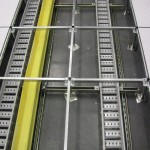
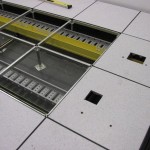
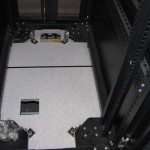
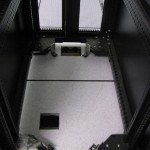
We are so so close to the full openening of stage one! We are looking at an open day of today or tomorrow, I have posted photos below of the near completed stage.