



Category: dedicated server performance
SSD RAID 10 IOPS Testing - H700 Perc RAID Card Testing R710
Recently we’ve been playing with H700 RAID cards with SSD’s. We have had some issues which will be outlined in future follow up posts with SSD’s & H700 Compatibilities.
6 x 256GB Crucial M4 Firmware 0309 all confirmed in a RAID 10 array.
Testing tool : Fio 1.38 64bit
Fio is quite easy to configure and setup in all major linux distribution. We are testing it on Debian which is quite easy to install J From CLI (command line interface) just run the following commands:
This will update the Package Index. The APT package index is essentially a database of available packages from the repositories defined in the /etc/apt/sources.list file.
To update the local package index with the latest changes made in repositories,
root@server:/# Apt-get update
This command will then install FIO from the remote repositories & any dependencies
root@server:/# Apt-get install fio
We then want to create the actual configuration file which will have all the variables for this test , because we are utilising SSD’s it’s a good idea to setup the configuration file with the following settings
The easiest way to create the configuration file is like this:
root@server:/# nano random.fio
Then you want to paste the following in:
[random]
rw=randread
size=1g
directory=/iops
iodepth=403
direct=1
blocksize=4k
numjobs=16
nrfiles=1
group_reporting
ioengine=sync
loops=1
The second last step is to create a folder where all the working/testing will take place in , in our case we created /iops in the following way:
root@server:/# mkdir /iops
The final step is the actual test J just run the application with the configuration file name trailing
root@server:/# fio random.fio
And your output should be something like this. I have highlights the main performance outputs for you in red to compare your results! So we got roughly 19,000IOPS @ 4K Reads J Quite fast if you ask me
random: (g=0): rw=randread, bs=4K-4K/4K-4K, ioengine=sync, iodepth=403
…
random: (g=0): rw=randread, bs=4K-4K/4K-4K, ioengine=sync, iodepth=403
Starting 8 processes
random: Laying out IO file(s) (1 file(s) / 1024MB)
random: Laying out IO file(s) (1 file(s) / 1024MB)
random: Laying out IO file(s) (1 file(s) / 1024MB)
random: Laying out IO file(s) (1 file(s) / 1024MB)
Jobs: 2 (f=2): [_r__r___] [97.3% done] [34022K/0K /s] [8306/0 iops] [eta 00m:03s
Jobs: 2 (f=2): [_r__r___] [98.2% done] [25875K/0K /s] [6317/0 iops] [eta 00m:02s
Jobs: 2 (f=2): [_r__r___] [100.0% done] [25381K/0K /s] [6196/0 iops] [eta 00m:00
random: (groupid=0, jobs=8): err= 0: pid=3884
read : io=8192MB, bw=75793KB/s, iops=18948, runt=110678msec
clat (usec): min=82, max=39244, avg=282.17, stdev=70.87
bw (KB/s) : min= 336, max=20720, per=18.60%, avg=14099.28, stdev=930.13
cpu : usr=2.51%, sys=32.11%, ctx=2077702, majf=0, minf=588
IO depths : 1=100.0%, 2=0.0%, 4=0.0%, 8=0.0%, 16=0.0%, 32=0.0%, >=64=0.0%
submit : 0=0.0%, 4=100.0%, 8=0.0%, 16=0.0%, 32=0.0%, 64=0.0%, >=64=0.0%
complete : 0=0.0%, 4=100.0%, 8=0.0%, 16=0.0%, 32=0.0%, 64=0.0%, >=64=0.0%
issued r/w: total=2097152/0, short=0/0
lat (usec): 100=0.02%, 250=7.38%, 500=81.68%, 750=10.65%, 1000=0.14%
lat (msec): 2=0.10%, 4=0.01%, 10=0.01%, 20=0.01%, 50=0.01%
Run status group 0 (all jobs):
READ: io=8192MB, aggrb=75792KB/s, minb=77611KB/s, maxb=77611KB/s, mint=110678 msec, maxt=110678msec
Disk stats (read/write):
dm-0: ios=2097110/1826990, merge=0/0, ticks=606753/2981152, in_queue=3673756, util=84.49%, aggrios=0/0, aggrmerge=0/0, aggrticks=0/0, aggrin_queue=0, aggrutil=0.00%
sda: ios=0/0, merge=0/0, ticks=0/0, in_queue=0, util=-nan%
If you can benefit from free web hosting, a free server, savings on data storage or would like to get your hands on a free iPad 2, Servers Australia could be your best friend this Christmas!
Servers Australia are rewarding our Facebook friends by giving away free web hosting to friends with an ABN. Our free web hosting includes 500MB Disk Space, 5 GB Data Transfer, cPanel Control Panel and more. Visit Servers Australia Facebook page to sign up for your free web hosting today.
It’s no secret that successful businesses and enterprises perform best with fast, secure and reliable servers. Add to your current server network or get your very first server for free and enter the draw to win a dedicated server here.
If you’re looking to expand your business and need more data space, we’re cutting your costs. Servers Australia are dismissing the setup fee for all new Equinix SYD3 Colocation customers until 20/12/12. You’ve one more week to jump on this special offer, saving you up to $199. See our website for more information.
We are giving away iPad 2 tablets! Servers Australia are giving away, one-for-one iPad 2′s with every E3-1245 starter series server or higher on a 24 month contract. That means if you buy 10 servers you get 10 iPad 2′s! See our servers series here.
Unlike Santa, we’re giving away these deals whether you’ve been naughty or nice -but we hope it’s the latter!
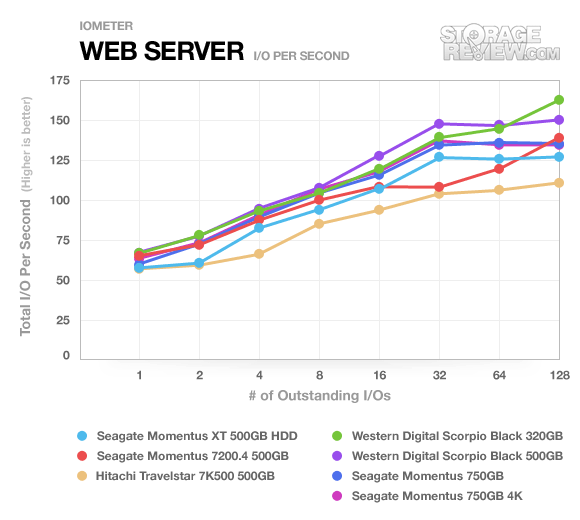
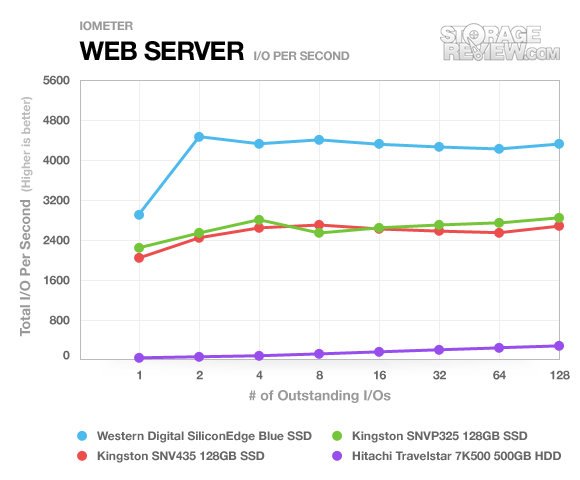
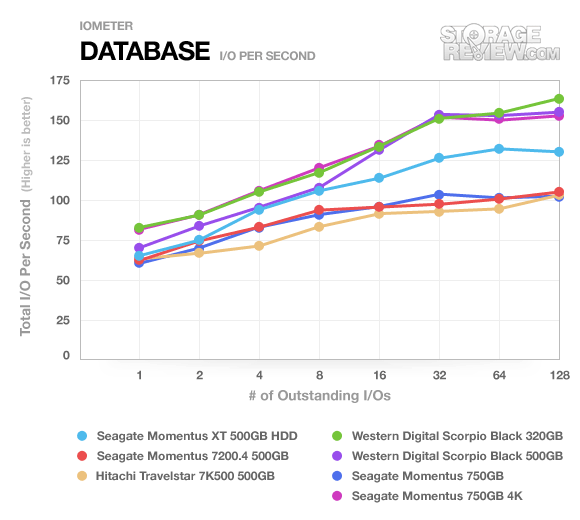
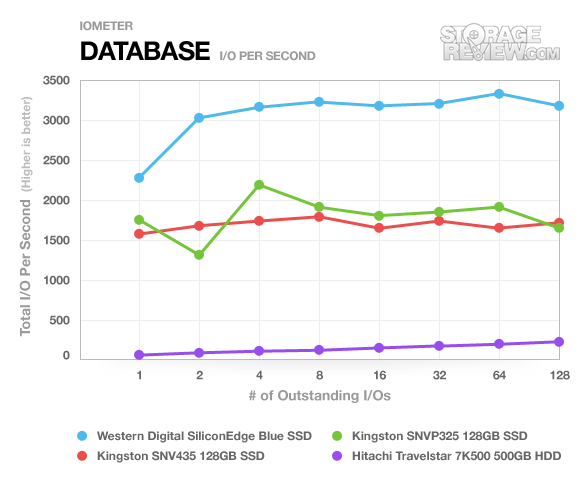
Here are some benchmarks to show the differences between SATA3 hard drives and solid state hard drives for dedicated server applications.
The first benchmark is for web server performance the second benchmark is for database performance.
SATA3 Web Server Performance:
Source: http://www.storagereview.com/seagate_momentus_750gb_review_st9750420as
SSD Web Server Performance:
Source: http://www.storagereview.com/kingston_ssdnow_v_review_snvp325s2
Summary:
SSD Performance: From 1600 I/O to 4700 I/O
SATA3 Performance: From 60 I/O to 170 I/O
This benchmark is for database performance.
SATA3 Database Performance:
Source: http://www.storagereview.com/seagate_momentus_750gb_review_st9750420as
SSD Database Performance:
Source: http://www.storagereview.com/kingston_ssdnow_v_review_snvp325s2
Summary:
SSD Performance: From 1350 I/O to 3350 I/O
SATA3 Performance: From 60 I/O to 170 I/O